

If your work is already organized as spreadsheet rows moving through repeatable steps, start with QR Code Status Tracker. It creates the Trak workflow for you while your team keeps using the Google Sheets™ spreadsheet it already understands.
Install QR Code Status Tracker
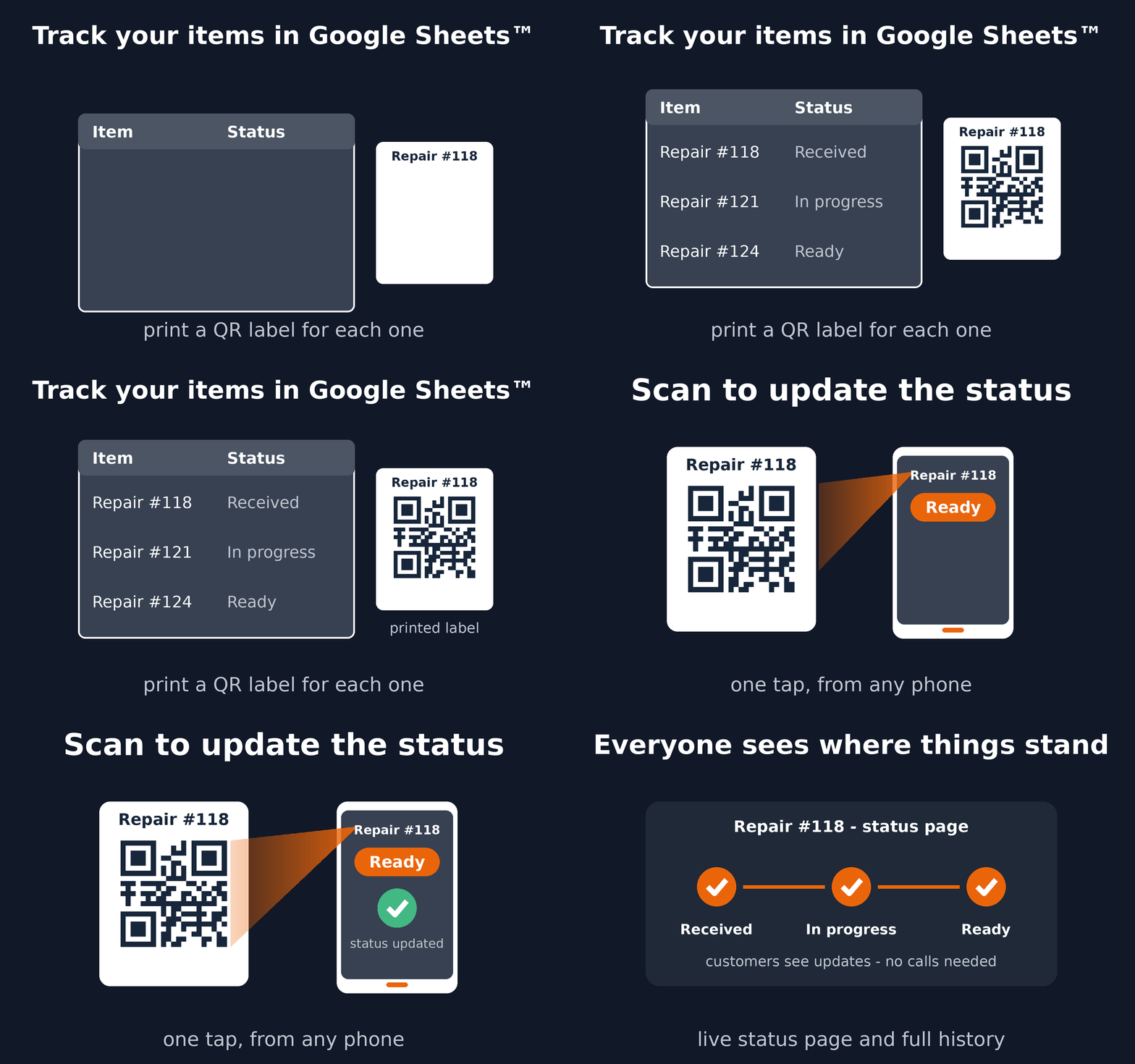
See the complete workflow
What you can configure yourself
- The Google Sheets™ tab that contains the items.
- An existing item code, serial number, barcode, or generated QR code.
- The named steps that match your process.
- Optional private customer progress links.
Staff can identify an item, move it to the next status, add a note, review its history, and undo a recent mistake. The same model works for service jobs, production stages, equipment handoffs, samples, applications, orders, and many other item workflows.
When you need a deeper custom Trak setup
Use a custom Trak setup when each step needs structured forms, complex transition rules, dashboards, GPS, signatures, dynamic locations, alerts, or integrations. Contact contact@darkaa.com and we can help design it.
Read the Status Tracker setup guide or install it from Google Workspace Marketplace™.
Google Sheets™ and Google Workspace Marketplace™ are trademarks of Google LLC.
QR Code Status Tracker documents: Terms of Service and Privacy Policy.